Table of Contents
This practical guide explains how to download only up, the most inhibiting game right now with clear steps and useful context. It also covers common requirements, potential problems, and the details that can help you get better results.
You will have to run, jump, overcome obstacles that will make you "sweat hands" when participating in the game. Especially the small and winding roads. If you want to experience Only Up on PC, you can download it according to the instructions below.
Download Only Up on Your Computer
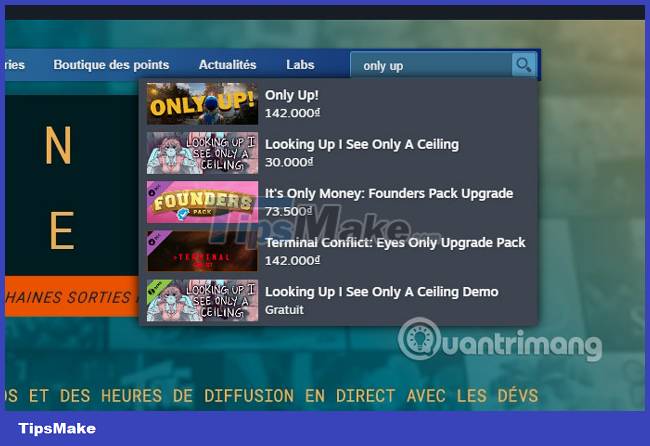
Step 1: First, download Steam on your computer, install and launch Steam. Log in to your account and search for the Only Up keyword in the game's search bar as shown below.
Step 2: Then select Add to cart and proceed with the following steps to download Only Up, this is a paid game so you will have to spend money to be able to own the game.
See how to buy games on Steam if you have never bought games on Steam.
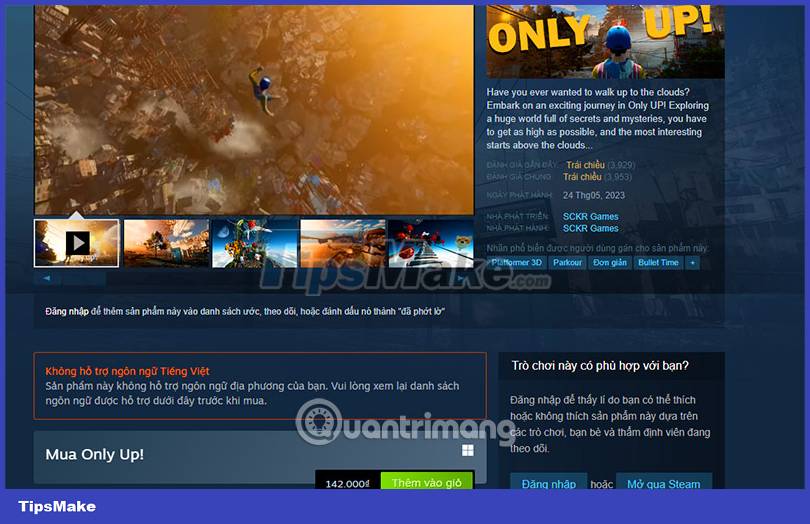
Configure Playing Only Up on the Computer

Minimum configuration:
- Requires 64-bit processor and operating system
- Operating System: Windows 8/10/11 (64-Bit)
- CPU: Intel Core i5-6600@ 3.1 GHz or AMD R5 1600X @ 3.5 GHz or higher
- RAM memory: 8GB RAM
- Graphics Card: NVIDIA GeForce GTX 1650 or equivalent
- DirectX:Version 12
- Free hard drive: 6 GB free space
Recommended configuration:
- Requires 64-bit processor and operating system
- Operating System: Windows 8/10/11 (64-Bit)
- CPU: Intel Core i5 10400 3.1 GHz or AMD Ryzen 5 2600x 3.1 GHz
- RAM memory: 16GB RAM
- Graphics Card: NVIDIA GeForce RTX 3060 or equivalent
- DirectX: Version 12
- Free hard drive: 6 GB free space
Only Up Is What Game?
Only Up can be said to be a rather time-consuming game for those who make mistakes. You will have to travel your distance if you accidentally fall down before. The game is inspired by the fairy tale "Jack and the magic bean tree" and reminds people of platformer games. You will take the same mythical path as Jack to achieve something more than just climbing to the top.
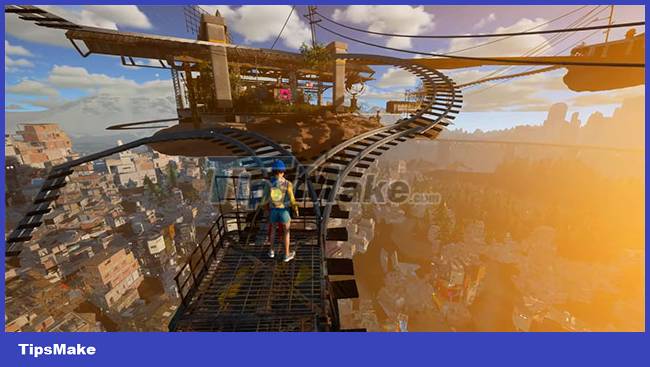
Among the game's features, the ability to slow down time and change your character's speed, you should collect as much as possible before making one of your jumps. The game also contains many Easter eggs and items for you to collect and use.
Conclusion
Understanding Only Up makes it easier to compare options, avoid common mistakes, and apply the information in this guide more effectively. Review the relevant requirements before making changes or choosing a solution.
FAQ
How do you download only up, the most inhibiting game right now?
Follow the steps in this guide in order, confirm the required settings or tools, and verify the result before making additional changes.
Is it safe to download only up, the most inhibiting game right now?
It is generally safe when you follow the recommended instructions, use trusted tools, and avoid changing settings you do not understand.
What should you do if the process does not work?
Recheck the requirements, restart the device or application when appropriate, and review each step for missed settings or compatibility issues.
Related Articles
 How to Download the Sims 3 Game: Complete Guide11 minutes read
 Instructions on how to download Ninja Lead game on PC5 minutes read
 How to Download Pho Anh Hai iOS, Android: Step-by-Step Guide5 minutes read
 The Website Offers Free Games6 minutes read
 How to Download and Play the Chinese Game3 minutes read
 Download Adventure Game Pathway Are Free3 minutes read
Reader Comments 0
Sign in with email or Google to join the discussion.