Table of Contents
This guide covers dell studio xps 16 - 'good wood, good paint' with practical context and easy-to-follow details. Use it to understand the subject and apply the information confidently.
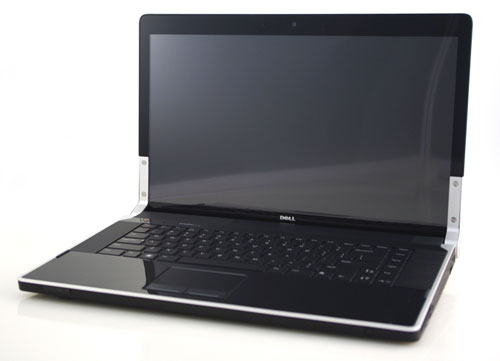 Studio XPS 16 is a combination of two Dell models Photo: Notebookreview .
Dell XPS Studio 16 also officially erases the notion that Dell's laptops are often very heavy, square and sharp and have rough parts. Black and silver are the two main colors of the machine, which makes XPS Studio 16 look elegant. If the combination of magnesium alloy with plastic material provides certainty for the chassis, the shiny aluminum border with leather cover provides the luxury for the user. Featured on the black background of the case is the Dell logo which is very familiar to the company, but there is one point that the user must pay attention to is the very strange rotary joints that Dell is equipped very specifically in this model, it is the successor. Redundancy and promotion of solid rotary joints of XPS series laptops. It is equipped with a 16-inch high-resolution 1080p Full HD mirror screen, 1, 920 x 1, 080 pixels. More specifically than other LCD monitors, the Dell XPS Studio 16 uses RGBLED LCD technology to deliver images with better colors, more realistic and higher contrast levels that are suitable for enjoying movies. High-definition (HD) or admire digital pixels of many pixels. To protect the screen, Dell has put on an oversized coating on the screen, so it has caused strong reflection when working in bright environments. But in contrast when using the machine in a dark room or under-lighting conditions, the screen shows its effectiveness.
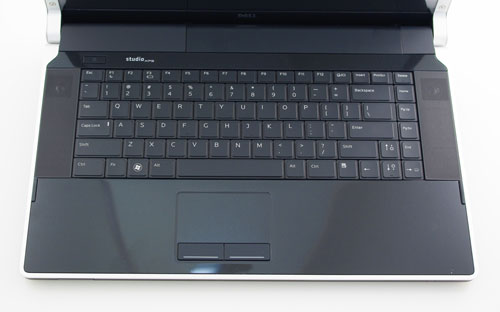 The keyboard features the Vaio or MacBook Photo: Notebookreview .
The Dell XPS Studio 16 keyboard has the same characteristics as the keyboard of the Vaio or MacBook, with floating, flat and wide keys. However, the combination of the LED backlight system on the keys brings a modern tap to this model, and is very effective when users work late or in a dark room. If the LED backlight system is new, the multimedia key tap controls right above the keyboard are the traditional inheritance of previous Dell laptops. The size of the keyboard of XPS Studio 16 was reduced by Dell to give a portion of the space for the 5. 1 high-capacity speakers, so there would be no separate numeric keys as in Dell Studio 17, but the keys were still very sensitive and handy. To harmonize with the keyboard size, the touchpad (touchpad) is also smaller, but feels very smooth to use.
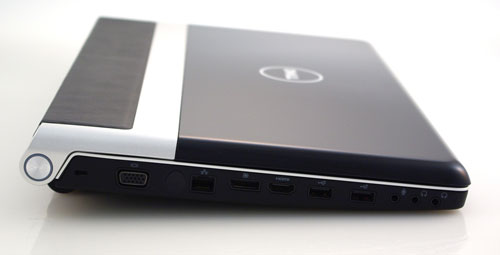 Ports on the side of the machine Photo: Notebookreview .
XPS Studio 16 is full of the most basic and modern connectivity tools, such as: 2 USB ports, one e-SATA and USB, HDMI and DisplayPort, FireWire, VGA, LAN, 2 headphone jacks and one for the microphone, 8 in 1 memory card reader, Bluetooth port, 802. 11a / b / g / n Wi-Fi card and ExpressCard / 54 slot. Equipped with HDMI (High Difinition Multimedia Interface) high-definition multimedia interface, it is very suitable for connecting with the popular and popular HD TVs to enjoy movies, music video clips with Excellent sound quality and extremely high definition. 2 headphone jacks offer flexibility in connection options with external speaker and headphone simultaneously. The Studio XPS 16 DVD drive uses slot-loading technology, but these slot-loading drives tend to sound louder than traditional disc tray loading. If using a swivel-type slot to reduce the body thickness, Dell has ceded quite a bit of space on both sides for two large stereo speakers and a subwoofer. Thanks to that, the Studio XPS 16 has much better sound quality than other laptops, will definitely satisfy the demand of enjoying high quality music of users.
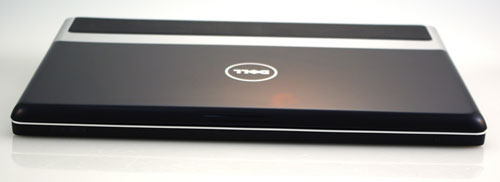 Studio XPS 16 is highly configurable Photo: Notebookreview .
FAQ
What should I check before following these steps?
Confirm device and software compatibility, save important data, and make sure you have the required permissions, files, and account access.
Why might the process not work?
Common causes include outdated software, missing permissions, incompatible hardware, an unstable connection, or completing a step in the wrong order.
Can I undo the changes if necessary?
That depends on the tool or setting. Use built-in restore options when available, keep a backup, and record the original configuration first.
Related Articles
 Dell Is About to Release Studio XPS 15 and 17 Inches3 minutes read
 How to Dye Sola Wood Flowers with Acrylic Paint9 minutes read
 Pocket Experience and Address to Buy the Best Cheap Wood Saw9 minutes read
 Clip Studio Paint -- Professional Comic Drawing Software on iOS3 minutes read
 Dell Studio 15558 minutes read
 The New Dell Studio 15 Is Colorful with 6 Colors3 minutes read
Reader Comments 0
Sign in with email or Google to join the discussion.