Table of Contents
Roblox Fisch lets players play approved Roblox audio through the in-game radio. The table below collects song IDs you can try during fishing sessions, followed by the steps for entering a code. Audio availability can change, so a code that once worked may later be muted or removed.
Roblox Fisch song ID list
Copy the numeric ID for the track you want to play. If a code produces no sound, check that it was entered correctly and try another: Roblox moderation, licensing changes, or an uploader removing the audio can make individual IDs unavailable.
| Song | Song ID |
| Believe | 1843571678 |
| Better Off Alone | 4830329009 |
| Big Guy | 9040178427 |
| Chipi Chapa | 16190783444 |
| Control Machine | 6715244531 |
| Company | 15689450321 |
| DanTDM | 7067218270 |
| DaDa | 1840745145 |
| Disco | 7006487793 |
| Drain | 9128808411 |
| Dreams | 1837103530 |
| Dubstep | 9056494728 |
| Elisa | 1845904911 |
| Fire Rock | 1837335320 |
| Four Me | 7029051434 |
| FNAF | 1846746381 |
| Fur Elise | 1836283178 |
| GTA | 14366981664 |
| Hands Up | 1840654132 |
| High IQ | 2420866589 |
| It Goes Down | 14145619621 |
| In a Mark | 9046586514 |
| It's Not | 1835716628 |
| King is Back | 1837110194 |
| Lagi | 14366983688 |
| Lil Drake | 8418962168 |
| Love is | 7029092469 |
| Mafia | 14145626412 |
| Mellow Chill | 1845348751 |
| Montreal | 1835848221 |
| No Shame | 9046543277 |
| Prismo | 16831107981 |
| OG Loc | 7150246303 |
| Old School | 1846329062 |
| Ordinary | 1836255710 |
| Reject | 8456710248 |
| Ronaldo | 8192297640 |
| SSS | 15689450026 |
| Sans | 4002157022 |
| Silver | 5431463524 |
| Siren Psyqui | 7295463788 |
| Sos | 7179269563 |
| So Close | 1836382709 |
| Tadtaran | 9009661151 |
| Techno Metal | 1846612949 |
| Tokyo | 5410085694 |
| Together | 16190783110 |
| Tree Bee Way | 6632938263 |
| Tupac | 9127036724 |
| Video | 9042394889 |
How to use a music ID in Fisch
You need access to Fisch's radio feature before you can enter a music code. The original version of the game listed this as a paid Radio Pass; because game-pass pricing and menus can change, confirm the current details in the in-game store before purchasing.
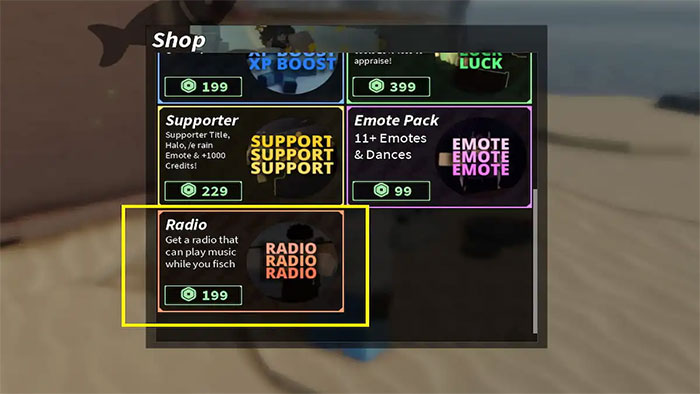
- Open Fisch and select the store from the main menu.
- Find the Radio Pass or radio option and review its current price and description.
- After unlocking it, equip the radio from your available items.
- Enter one of the numeric IDs from the table and play the track.
If the radio controls do not appear, rejoin the experience after confirming that the purchase is attached to the same Roblox account. A silent track usually indicates a problem with that particular audio ID rather than the radio itself.
Using the radio around other players
The radio can be used while exploring or fishing, but other players may not want to hear the same music. Keep the volume reasonable and use quieter or private areas when possible. If the pass is presented as a standard one-time game pass, it normally does not require a recurring subscription; rely on the current store description for the terms that apply to your account.
Related Articles
 Roblox Fisch Rod Progression Guide: Best Upgrade Path15 minutes read
 Best Spells in Roblox Fisch14 minutes read
 minutes read
 Latest Fisch Roblox Codes and How to Redeem Codes4 minutes read
 The Hottest Music Ids and Hit Songs in Roblox: Complete List9 minutes read
 How to Get Santa's Miracle Rod in Fisch: Step-by-Step Guide6 minutes read
Reader Comments 0
Sign in with email or Google to join the discussion.