Table of Contents
Overview
This guide examines the question 'Bluetooth Headset Is Noisy, What Is the Cause and How to Fix It?' in clear, practical terms. It covers the key concepts, recommended steps, common limitations, and useful checks so you can make a better-informed decision.
In today's new technology era, Bluetooth headphones are gradually replacing wired headphones. However, many people encounter the problem of Bluetooth headphones being distorted, causing inconvenience during use. Affecting relaxation and entertainment.
So what causes the bluetooth headset to be noisy? And how to fix the problem of bluetooth headset being noisy? Let's explore through This guide!
Causes of Bluetooth headset noise
Bluetooth headset is noisy due to being near radio transmitters
The phenomenon of Bluetooth headphones being distorted will occur if you leave them near devices that emit radio waves, such as: refrigerators, Wi-Fi routers, computers, microwave ovens, etc. These devices will cause interference, making the sound transmission not smooth.
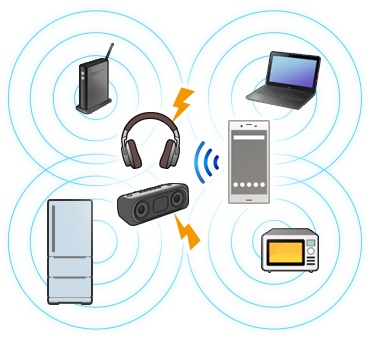
➤ The solution to this cause of Bluetooth headset noise is straightforward, you just need to avoid radio transmitting devices, you will have a great connection.
Bluetooth headset encounters obstacle causing sound distortion
Normally, we often have the habit of using Bluetooth headsets when leaving our phones in our backpacks or bags while traveling. At this time, your body has become an obstacle to the transmission of Bluetooth headsets and broadcasting devices.

➤ And the way to fix the Bluetooth headset being distorted in this case is straightforward: you should place the broadcasting device in a place where there are no obstacles or the obstacles are not too large.
Because the Bluetooth device and the transmitter are too far apart
One of the most common causes of Bluetooth headset noise is: You accidentally wore the Bluetooth headset far away from the broadcasting area of your phone or computer.
➤ The solution to this situation is to always keep the headphones and the transmitter as close as possible to ensure transmission.
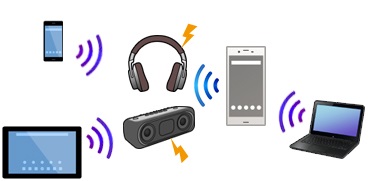
Your bluetooth headset is broken
If your Bluetooth headset is noisy and does not fall into the above 4 cases, it may be because your headset is having some problems. So go to a reputable store to fix it immediately.
Because the audio file is high resolution
The reason is that audio files with too high resolution will also affect the sound quality, causing the Bluetooth headset to be distorted.
➤ You can fix the problem of Bluetooth headset noise in this case by changing the sound quality settings.
Ways to fix noisy bluetooth headphones
We need to rely on the cause of the Bluetooth headset being noisy to come up with the most reasonable solution. Note some of the following cases!
- You need to stay away from radio devices when using bluetooth headphones: microwave ovens, refrigerators, Wi-Fi transmitters, computers, etc. Doing so will help prevent radio waves connecting the headphones and the transmitter from being interfered with. And in case the bluetooth headphones have a noise cancellation feature, you should turn it off.
- Turn off all bluetooth connection broadcasting features of surrounding devices.
- Be careful not to leave the device connected to the headset in your pocket, shirt pocket, bag, etc., or any object that blocks the Bluetooth signal. Doing so can help you resolve the problem of the headset being noisy.
- Keep the bluetooth headset and the source as close together as possible.
- Reset the quality of audio data playback via Bluetooth.
- Only play audio files that have completed the download process.
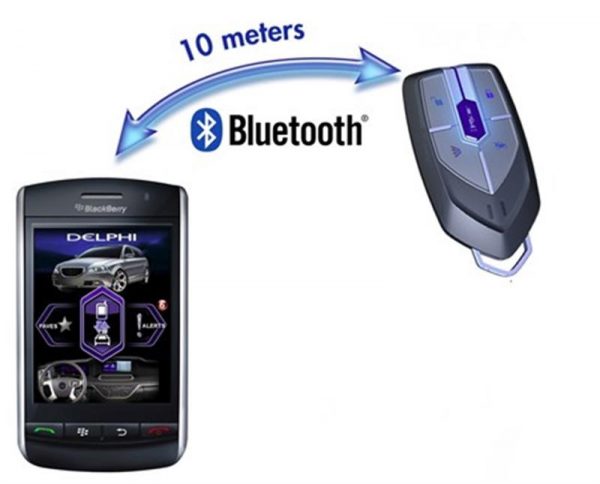
In addition to the above methods to fix noisy Bluetooth headphones, you can also apply some other methods such as:
- Remove unnecessary software on your phone, tablet, laptop. This will help prevent software conflicts and prevent noise when using Bluetooth headphones.
- Dry the headphones immediately if they fall down. If the headphones are noisy when reconnecting, you should buy a new pair.
- Always keep the headphones in a dry place, avoid places with high humidity.
- Finally, restarting the headset and the transmitter is the simplest and most effective way. Reconnect the two devices to see if it works. If it doesn't work, you should take the headset to be repaired or buy a new one.
As we know, the situation of Bluetooth headsets being noisy is not uncommon. However, you can completely fix it by finding out the cause. And in case you cannot fix it yourself, you should seek the help of a repair technician. If your financial conditions allow, you can buy a new headset to use. At this guide, there are a variety of genuine headset models, the most competitive prices today. Contact hotline 19001903 for the most dedicated advice.
Key Takeaways
Use the guidance above as a practical reference for bluetooth headset is noisy, what is the cause. Check compatibility, follow the steps carefully, and verify important details with official documentation when software, security, accounts, health, or purchases are involved.
FAQ
Bluetooth Headset Is Noisy, What Is the Cause and How to Fix It?
The answer depends on the conditions, limitations, and evidence explained in this article. Review the relevant section before applying the conclusion to your situation.
What factors can change the answer?
Hardware, software version, location, budget, compatibility, timing, and individual requirements can all affect the result.
How can I verify the information for my situation?
Check current official documentation, compare your exact model or account settings, and confirm any time-sensitive details before acting.
Related Articles
 How to Use the Bluetooth Headset Properly6 minutes readExperience and Instructions for Using the Plantronics E10 Bluetooth7 minutes readExperience the Plantronics Bluetooth Headset ML15: Clear Conversations6 minutes read
 Sony XB950BT Bluetooth Headset: Add an Ideal Choice for Bass Addicts7 minutes read
 Sony XB650BT Review: Stylish, Booming Headset with Powerful Bass7 minutes read
 How to Connect Your Phone to a Bluetooth Headset: Complete Guide7 minutes read
Reader Comments 0
Sign in with email or Google to join the discussion.