Table of Contents
This guide covers acer 4630 - affordable price for terrible configuration with practical context and easy-to-follow details. Use it to understand the subject and apply the information confidently.
 Acer Extensa 4630 screen 14. 1 inch Photo: CMC .
Acer Extensa 4630 has a simple design and faithful to the typical design of Acer. The case is dark gray, accentuating the Acer logo as a highlight. Although the design is not as impressive as other products, it still attracts users thanks to the characteristic color of Acer. Weight of 2. 4 kg including 6-cell battery is not too heavy for Vietnamese users. The connection ports are arranged on both sides of the body quite reasonably and richly. The DVD-RW Multi Recorder drive on the side, the other connection ports are concentrated on the left, arranged logically to help users feel comfortable in use. In particular, the most notable is the HDMI interface that supports the entertainment system. Acer EasyPort IV allows connection between Acer laptop computers. The front of the Extensa 4630 is the audio connection port, turning on and off the wireless connection and LED status notification. Radiator slots are arranged in the back so you don't have to worry about the uncomfortable feeling of the machine's exit temperature when using the mouse. 14. 1 "WXGA LCD display with 1, 280 x 800 pixel resolution uses CrystalBrite technology so images display crisp, bright and true colors, a characteristic curved keyboard, full size, feels sympathetic In addition, the speaker system is located above the keyboard and CrystalEye webcam and an integrated microphone support online meetings via the Internet. Above the keyboard is a series of quick-press keys, which instantly manipulate the device's features. The touchpad is wide and quite responsive.
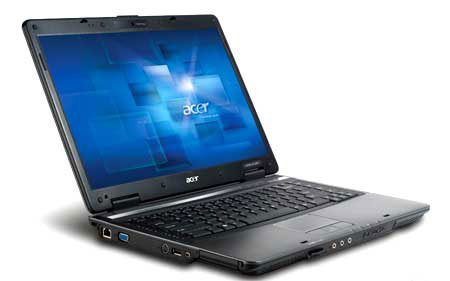 Mirror screen resolution of 1, 280 x 800 pixels Photo: CMC .
It uses Intel's latest Centrino 2 platform, equipped with an Intel Core 2 Duo T6600 processor (2. 2 GHz, 2 MB L2 800 MHz FSB). GMA 4500 MHD integrated graphics card, 2 GB DDR2-667 RAM, 250 GB hard drive, DVD-Super Multi DL, Bluetooth connection, Wireless 802. 11 a / b / g / draft-N, card reader 5 in 1 SD / MMC / MS / Pro / XD. With this configuration, Extensa 4630 has quite strong performance. In addition to office apps for work, Extensa 4630's entertainment capabilities are very good. With Intel's integrated speaker system and integrated GMA 4500MHD graphics chip, you can enjoy music and movies in your spare time, alongside online games. Acer Extensa 4630 has many configurations with many prices. Most versions of Intel's new processor apps. The basic configuration is the Intel Core 2 Duo T3400 (2. 16 GHz, 1 MB L2 667 MHz FSB memory). In addition, Acer exclusive features are also integrated, such as proprietary DASP anti-shock technology (shock protection, hard drive protection), SignalUP supports wireless connectivity, security with fingerprints. , EasyPortIV port connects to other computers or devices. Empowering Technology set includes many management programs, such as eDataSecurity (security management), eNet (network information management), ePower Management (power management battery power), eRecovery (system recovery). With 6-cell battery capacity, you can use up to 4 hours. The starting price is 10, 585, 000 (VAT not included) for Acer Extensa EX 4630Z-341G16Mn version.
FAQ
What should I check before following these steps?
Confirm device and software compatibility, save important data, and make sure you have the required permissions, files, and account access.
Why might the process not work?
Common causes include outdated software, missing permissions, incompatible hardware, an unstable connection, or completing a step in the wrong order.
Can I undo the changes if necessary?
That depends on the tool or setting. Use built-in restore options when available, keep a backup, and record the original configuration first.
Related Articles
 Acer Introduces Swift X, the Thinnest and Lightest Laptop4 minutes read
 Acer Launched the New Aspire One Configuration3 minutes read
 Acer Increased Aspire S3 Ultrabook Configuration to Compete MacBook Air3 minutes read
 Realme 3i Comes with Helio P60 Chip, Water Drop Screen, 4.230mah3 minutes read
 10 Best-selling Laptops in January 20103 minutes read
 Acer Reduced the Price of Notebooks3 minutes read
Reader Comments 0
Sign in with email or Google to join the discussion.