Table of Contents
This guide provides a clear overview of sonic speed simulator, including Instructions to Play Roblox Sonic Speed Simulator. Use it to understand the topic, compare the available options, and make a more informed decision.

Instructions to Play Roblox Sonic Speed Simulator
To get started, visit the Roblox page of the Sonic Speed Simulator game. If playing on a mobile device, people just need to enter the name to search for the game.
The first thing new players need to do is familiarize themselves with the controls. If playing the game on PC, press SPACEBAR to jump. Press again in the air to perform a homing attack.
Pressing Shift helps the character perform a rotation, rolling into a ball. Also, holding down this button will make the swing more powerful.
The first thing people will notice when they first play is that their character is moving extremely slow. This is normal, because first, gamers need to achieve a few levels to increase the speed of the character.

Keep moving forward to see a row of glowing diamonds. These are Chaos Orbs, which reward the player with experience points. The color of the Chaos Orb determines how much EXP will be gained:
- White Chaos Orb: Extremely small amount of XP
- Blue Chaos Orb: Small amount of XP
- Purple Chaos Orb: Average XP
- Red Chaos Orb: Huge amount of XP
- Golden Chaos Orb: Huge amount of XP
Characters will also earn XP for simple moves, so continue to let Sonic run a lot.
This will help level up, thereby increasing the maximum speed and movement power of the character to run faster and jump further.
Now, the character can freely go anywhere, collecting experience points naturally by running around exploring the world. On your journey, be sure to collect Rings, which can be used to purchase special items.
Near the spawn point, there will be a vending machine that uses Ring to buy and sell. Players get a random item from here, and each vending machine has its own set of items. Chaos and Trail increase the amount of EXP and Ring the character gains, so buy them when you have enough Rings.

If you want to get more Rings quickly, follow Obby Ring. They look like giant rings with words in them, very recognizable.
The Obby Rings will take the character to short obstacle courses with the reward of a lot of Rings at the end. Players can take these courses after the 6 hour cooldown has passed to stock up on Rings.
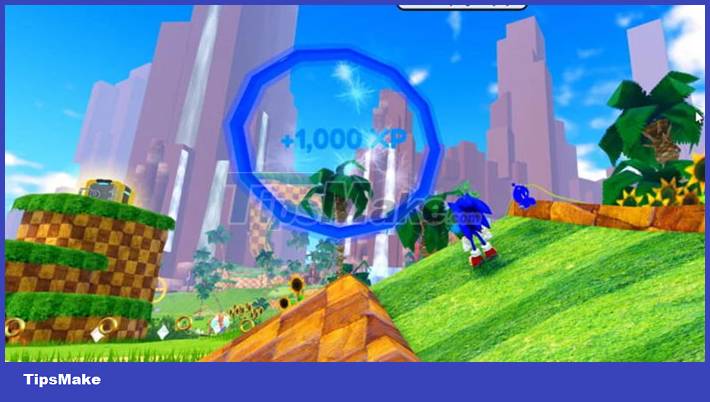
If you want a lot of XP quickly, look for some Sky Rings floating around. They are multicolored rings that reward XP inside.
All the gamer needs to do is go through the ring. Everyone will probably have to level up a few times to get enough speed and power to surpass the Sky Ring.
Just like Chaos Orb and Ring, they will disappear after being collected but will also reappear. This is definitely a rich source of EXP not to be missed.
Conclusion
Understanding Sonic Speed Simulator makes it easier to compare options, avoid common mistakes, and apply the information in this guide more effectively. Review the relevant requirements before making changes or choosing a solution.
FAQ
What is Sonic Speed Simulator?
The first thing new players need to do is familiarize themselves with the controls.
Why is Sonic Speed Simulator important?
Understanding Sonic Speed Simulator helps you evaluate features, compatibility, performance, and potential limitations before you choose a product or follow a procedure.
What should you consider when using or choosing Sonic Speed Simulator?
Consider your specific goal, compatibility requirements, available features, cost, security, and the practical recommendations described in this guide.
Related Articles
 Sonic Speed Simulator: Complete Guide4 minutes read
 Ways to Collect Rewards in Sonic Speed Simulator4 minutes read
 Instructions to Unlock Character Skins in Sonic Speed Simulator6 minutes read
 Tips to Level Up Quickly in Sonic Speed Simulator5 minutes read
 Latest Roblox Code Pet Evolution Simulator3 minutes read
 Instructions for Entering the Latest Pet Simulator X Codes and Codes4 minutes read
Reader Comments 0
Sign in with email or Google to join the discussion.