Table of Contents
Follow the instructions below to adjust the refrigerator temperature samsung, sharp efficiently and safely. Each section focuses on the actions, settings, and troubleshooting details that matter most.
Choosing the right temperature will not only help the refrigerator to operate sustainably, but it will also help the food to be fresh and full, while saving energy efficiently.
How Adjust the Refrigerator Temperature Samsung, Sharp Works
If you do not know how To adjust the refrigerator temperature Properly, please refer to our article below.

1. Temperature adjustment button
Temp button. Control is usually designed as a circular knob and is usually arranged in a cool compartment. However, it has the function of adjusting the temperature for both the cooler and the freezer.
When turning the numbers close to Max, both the cooler and the freezer are colder.
When turning min level numbers, the cabinet will be less cold and operate at low capacity.

2. Wind volume adjustment button
This button is usually designed as a slider, located on the freezer and it has the effect of adjusting the amount of wind for the freezer.
When dragging the slider to the Max button, the blower will blow maximum into the freezer, which means that the wind at the cooler will be reduced.
When sliding to the Min button, the wind in the freezer compartment will be less and will flow to the cooler.

When choosing the temperature to adjust for the refrigerator, you need to pay attention to the following two factors:
- What is the amount of food in the cabinet: If you have many food in the cupboard, you should turn the Temp. Control button to level 6 or 7 (Level near Max). If the cabinet contains less food you should choose level 3 or 4.
- Freeze and freeze, which compartment contains more food: If the ice compartment is more food, pull the wind switch to the right. And vice versa if the freezer is less food than the cooler. In some other cases, you may be able to adjust the wind level to about average.
Normally the freezer will preserve fresh and dry meats, fish and seafood. The right temperature to preserve these types of food is at -18 degrees Celsius.
In the case of little food, you can adjust to -12 degrees Celsius. However, at this level the storage time will not be long.
Many people think, the cooler the lower the temperature, the better. However, according to the researchers, the most suitable heat level for the cooler is 2-4 degrees Celsius. This heat level, is suitable for preserving all types of food in the cooler. But, you should pay attention, the preservation time should only be from 7-10 days only.
Normally, you just need to adjust the cool compartment to level 4. when needed to be colder, you can adjust it to 5, 6 or 7.
How to adjust Samsung refrigerator temperature with electronic control panel:
- Adjust the Fridge button similar to the upper twist knob. This button also allows you to adjust the temperature from 1 - 7 degrees Celsius and you should choose the level of 2-4 degrees Celsius.
- The air volume control button is similar to the one mentioned above.
How to adjust Samsung refrigerator temperature 2 indoor units:
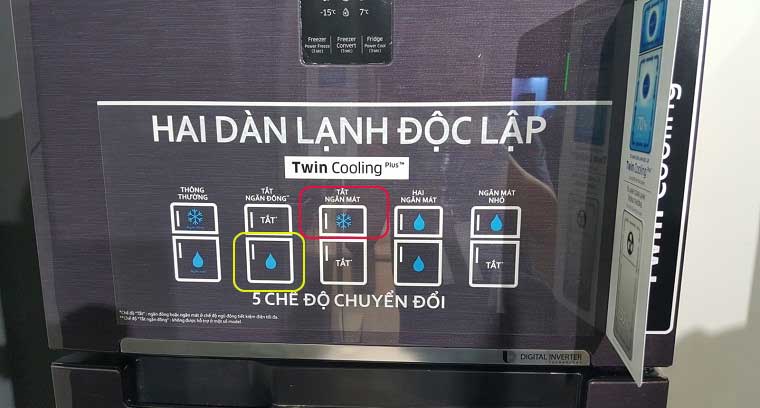
The yellow button is to adjust the temperature for the freezer.
The red button is to adjust the temperature for the cooler.
The temperature appears in the screen above. Each time you press, the temperature will increase by 1 degree.
With a 1-button adjustable fridge: This only allows you to adjust the temperature for the entire cabinet, no buttons to adjust the wind level. You do the same as above.
With a refrigerator with 2 adjustable buttons: One is the temperature control button in the cooler, the other is the wind level adjustment. You proceed as normal.

To set the temperature for the freezer, click the FREEZER Button. Each touch, the temperature will increase by 1 degree. If the stone compartment contains a few items, it is recommended to choose a temperature of -19 degrees Celsius.
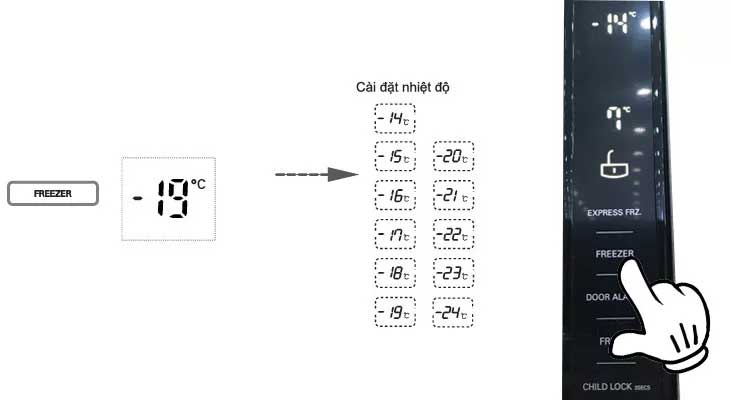
To adjust the cool stop temperature, press the FRIDGE Button, each touch also increases by 1 degree. Cooler temperature is limited to 1 - 7 degrees Celsius and is recommended to be set at 4 degrees.

Adjusting the temperature for the refrigerator is very important. Hopefully, with the above information, you can adjust the temperature of your family's cabinet appropriately to achieve the highest efficiency.
Good luck!
>> Article reference:
- How to clean the refrigerator properly?
- Select the capacity of the refrigerator to match the number of family members
- Discover the smallest mini fridge super convenient
- Cause and way to fix the phenomenon of refrigerators running continuously without interruption
FAQ
What should I prepare before I adjust the refrigerator temperature samsung, sharp?
Review the requirements in the guide, confirm that your device or software is compatible, and save important work before changing settings related to adjust the refrigerator temperature samsung, sharp.
Why might adjust the refrigerator temperature samsung, sharp not work as expected?
The most common causes are incompatible versions, missing permissions, incorrect settings, or an interrupted internet connection. Recheck each step and restart the app or device when appropriate.
Can beginners follow these adjust the refrigerator temperature samsung, sharp steps?
Yes. Follow the steps in order, avoid skipping confirmation screens, and compare your interface with the screenshots because labels may differ slightly between versions.
Related Articles
 How Much Is Reasonable to Regulate Refrigerator Temperature?5 minutes read
 Great Effect of Energy Saving Refrigerator That Every Family Should6 minutes read
 What Are the Sizes of Mini Refrigerators, 2 Wings, Side by5 minutes read
 The Common Side by Side Fridge Size4 minutes read
 Turns Out This Is the Reason Why the Refrigerator Has 2 Temperature5 minutes read
 Compare Sharp, Toshiba and Panasonic Air Conditioners11 minutes read
Reader Comments 0
Sign in with email or Google to join the discussion.