Table of Contents
This updated guide examines Review Asus Zenbook 14 Ux433f: a 14-inch Full-screen Laptop and organizes the essential facts, background, and practical takeaways in clear American English.
Join TipsMake.com to evaluate the details of this laptop to see if it suits you!
Technical data
- CPU: Intel Core i7-8565U 1.8 GHz (quad core, 8MB cache, as many as 3.5GHz with Turbo Boost)
- Graphics: Intel UHD Graphics 620
- RAM: DDR4 8GB
- Screen: 14 inches, 1920 x 1080, IPS
- Memory: Intel NVMe SSD 512GB
- Ports: 1x USB-C, 1x USB-A 3.1, 1x USB-A 2.0, 1x HDMI, MicroSD
- Connectivity: Dual-band 802.11ac Gigabit WiFi, Bluetooth 5.0
- Camera: 3D IR HD Camera
- Weight: 2.62 pounds (1.19kg)
- Size: 12.56 x 7.83 x 0.63 inches (31.9 x 19.9 x 1.59cm)

Price
Priced at $ 1099, Asus Zenbook 14 gives users strong value but not too excellent.
Compared to the Full HD variant of the Dell XPS with a slower CPU and a little more money, this Zenbook 14 is definitely more attractive. If you choose the Lenovo Yoga 920 with the same price and also belongs to the 14-inch laptop group, you will also get a small SSD and slower CPU.
Design
Asus Zenbook 14 UX433F with bezels measuring just 2.9mm.
The end result is a staggering screen-to-body ratio of 92%. Most noticeable is the thin bottom border. Meanwhile, the bezel on the 6.1mm is a bit larger, to allow a webcam to be located above the screen, instead of being placed on the bottom bezel or chassis leading to a rather uncomfortable rotation.
Asus Zenbook 14 increases a bit in thickness, to give enough space for a pair of full-size USB Type A ports.

You also get a USB Type-C port, HDMI output port and microSD card slot. But conventional ports and power sockets, as opposed to charging via USB Type-C, give the Zenbook 14 a slightly outdated feel.
Overall, the design of this laptop is quite beautiful, with an all-metal chassis and spacious keyboard.
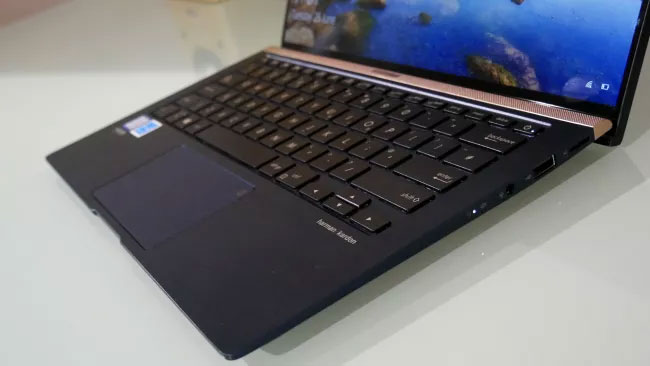
The inclusion of the Harmon Kardon speaker is also welcome, plus the integrated numeric keypad right on the trackpad is a great highlight. However, the trackpad should be large in size and react a bit faster.
IPS technology for good viewing angles and colors. But the brightness is merely sufficient and has a native resolution of 1920 x 1080.

Efficiency
The performance of other core components is more impressive. The Intel Core i7-8565U quad-core CPU will meet the most demanding workflows. An Intel 512GB NVMe SSD provides storage performance comparable to desktop computers.
Asus ZenBook 14 UX433F has a graphics and 8GB of RAM is not very impressive. This is not surprising for an Ultrabook, but note that you cannot run hundreds of browser tabs simultaneously.
It is also worth noting that Zenbook 14 tends to heat when running under moderate load and accelerates cooling fans earlier than you expect.
Harmon Kardon speakers produce absolutely good volume levels, but the soundstage is quite thin.
Battery life
The battery life of Asus Zenbook 14 UX433F is very surprising, lasting as many as 12 hours and 19 minutes in the test. You can safely leave the charger at home if you have to be outside all day.
Conclude
The new Asus Zenbook 14 UX433F delivers an amazing full screen experience. Zenbook 14 is also quite well-priced among 14-inch Ultrabooks and offers good performance. Combined with the thin bezels and not-so-thin screen, the Asus Zenbook 14 UX433F becomes a very good option to consider.
Advantages
- The screen-to-body ratio is amazing
- Well designed
- Good performance
Defect
- The screen is not really outstanding
- Port selection is slightly outdated
- Cannot charge using USB-C port
FAQ
What is Review Asus Zenbook 14 Ux433f: a 14-inch Full-screen Laptop about?
It provides a structured overview of ZenBook 14, explains the main context, and highlights practical takeaways for readers.
Why does this topic matter?
Understanding the main concepts helps readers evaluate the issue, avoid common mistakes, and make better-informed decisions.
How should readers use this information?
Use the guidance as a practical starting point, confirm details that may have changed, and follow current product, safety, or security recommendations.
Related Articles
 Asus Zenbook 15 Laptop Review: Compact, Comfortable Keyboard5 minutes read
 Review Asus Zenbook Pro Duo Ux581, a 2-screen Laptop from Asus40 minutes read
 ASUS Zenbook OLED - the Top Laptop Line from ASUS7 minutes read
 Asus Launched the New Zenbook from 799 USD4 minutes read
 ASUS Zenbook DUO (2024) UX8406 Review: the Surface Neo We Always Wanted14 minutes read
 Asus Zenbook Has Been Upgraded to a Full HD Screen3 minutes read
Reader Comments 0
Sign in with email or Google to join the discussion.