Article on the subject of "center icon on taskbar"
-
How to Center Taskbar Icons in Windows 10
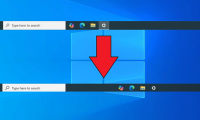
windows 10 doesn't have the centered taskbar icon layout like windows 11. however, you can center all icons except start and search bar to get the same look.
-
How to Center Taskbar Icons in Windows 10
windows 10 doesn't have the centered taskbar icon layout like windows 11. however, you can center all icons except start and search bar to get the same look.
-
How to center the Taskbar icons in Windows 10
falcon10 is a free program, designed to center icons in the taskbar. this program, after installation, will automatically center all icons in the taskbar, including icons pinned on the taskbar.
-
How to pin the app to the Taskbar to open it faster
there are many ways to pin the application to the taskbar, or the app icon to the taskbar. below, tipsmake.com will tell you 2 simple, quickest ways to pin software and applications to the taskbar. invite you to track offline.
-
Steps to recover lost Taskbar icon on Windows 10
pinning favorite apps to the taskbar can be very helpful. it saves you the hassle of searching for apps or having to use the start menu to open them. however, what happens when the pinned icons on your taskbar suddenly disappear?
-
How to fix icon loss, icon error on taskbar Windows 7
losing the icon on the taskbar or the icon, the broken shortcut on the taskbar, the start menu, the windows 7 desktop will make it difficult to control the activities on the computer. if you have lost the icon on the taskbar or broken the icon, please see how to fix this.
-
How to remove the 'chat' icon on the Windows 11 taskbar
you may not have noticed, but windows 11 provides a 'chat' icon that links directly to microsoft teams on the taskbar. clicking this icon gives you quick access to your list of chats in teams.
-
Turn off the Skype icon under the Taskbar after Sign Out
skype is one of the most used chat software today because of its simple, easy-to-use interface, high stability, allowing sending and receiving files directly. however, there is a small inconvenience, that is when the account is exited, the icon will still be under the taskbar whether you close it
-
How to left align the Windows 11 taskbar icon
by default, the windows 11 taskbar icons will be centered on the screen. this is also one of the features of this new operating system platform.
-
Wifi icon missing on the Taskbar Windows 10, this is how to fix
by default, the network or wifi icon always appears on the system tray of windows 10 taskbar so that users know if their computer is connected to the network? however for some reason (such as upgrading to windows or installing on windows 10 ...) that icon disappears. here's how to fix it.
-
How to retrieve the Volume icon disappears on the Taskbar? Windows 10?
sometimes icons suddenly disappear from the taskbar on the computer without knowing why. the situation even happens to windows 10. so the fix for this case is ...
-
How to delete / hide the language icon on the Windows 10 Taskbar
if the language icon on the taskbar doesn't suit your liking, follow the steps shown below to quickly delete or hide the language icon on the windows 10 taskbar.
-
Fix error Unikey does not show icon on Taskbar
during the process of working with unikey, you will encounter the unikey icon suddenly disappearing. the software is still running, we can still do the operations but the unikey icon dives.
-
How to change the Windows 11 Taskbar icon size to 32x32
windows 11 taskbar icons are displayed at 24x24 but are actually 32x32. this means icons are scaled down and can lead to blurry icons or other unpleasant images.
-
How to get the missing Wifi icon back from the Windows 10 taskbar.
the issue of the missing wi-fi icon on the windows 10 taskbar is a real headache and a nightmare for many people who intend to or have already updated to windows 10. this is because during the windows 10 download and installation process, some settings may change depending on the machine, causing
-
Error losing battery icon on Windows Taskbar 10/8/7
by default, the battery icon will appear under the taskbar on your computer, laptop. however for some reason the battery icon disappears, then you can apply some solutions below to fix the error and restore the battery icon back on the taskbar.
-
How to put the icon between the Taskbar and make the Taskbar transparent on Windows 10
the default characteristics of the taskbar in windows 10 are probably still enough to make the majority of users happy. however, did you know that you can completely make the taskbar look much more beautiful with colors from translucent to transparent with application icons in the middle?
-
How to add / remove the Meet Now icon on the Taskbar in Windows 10
earlier this year, microsoft introduced meet now in skype. meet now makes it easy to connect with anyone with just two clicks and each call can last up to 24 hours.
-
Instructions to change icon size on Windows 11 Taskbar
users can adjust and change the size of the icons on the taskbar to be smaller or larger, depending on each person's needs.
-
How to turn off, turn on, hide, icon icon on the Taskbar in Windows 10
the following article provides detailed instructions on how to turn off, turn on, hide and display the icon icon on the taskbar in windows 10 for example, the current tasbar bar has the following applications:
-
The Wifi icon is missing from the Windows Taskbar; here's how to fix it.
a missing wi-fi icon is usually just a minor software bug that can be easily fixed with a few simple steps.